In the highly competitive media buying environment, launching offers requires a comprehensive approach. It is not enough to choose a suitable product, prepare ad creatives, and send traffic to a landing page. It is important to consider the GEO, the specifics of the traffic source, the target audience, and the conditions of the particular affiliate program.
For arbitrageurs working with different traffic sources, a combination of a quality advertising account and properly configured infrastructure helps manage traffic more efficiently, test campaigns, and scale working setups.
In this guide, we will look at how to prepare an advertising setup for the Lolajack offer from CPAgetti, configure Cloaking.House, and what parameters to consider when working with different GEOs and traffic sources.
Cloaking Mechanics: How Does It Work?
In essence, cloaking is a traffic routing system. It allows you to set rules for processing traffic and determine which page will be shown to a user depending on the parameters of the visit.
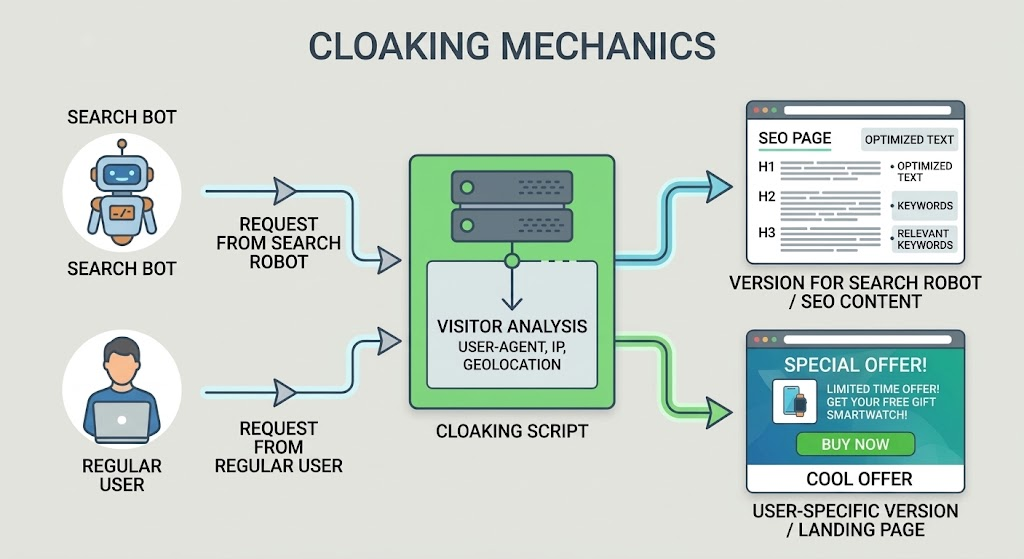
Within the advertising infrastructure, different pages are used:
- White Page: an informational page prepared according to the requirements of the traffic source.
- Offer Page: the landing page of the affiliate product to which targeted traffic is directed.
Cloaking.House allows you to configure routing between pages and take different traffic parameters into account.
This approach helps media buyers:
- Organize advertising infrastructure for different offers.
- Configure GEO and other traffic parameters.
- Create separate setups for different traffic sources.
- Control how routing works.
- Analyze traffic and filter triggers.
- Separate campaigns by source, GEO, and conditions.
Lolajack Offer: What We Are Setting Up the Advertising Campaign For
Before launching an advertising campaign, it is important to study the conditions of the specific offer. The same setup will not necessarily work for different sources and GEOs.
In this case, we will look at an advertising setup for Lolajack from CPAgetti.
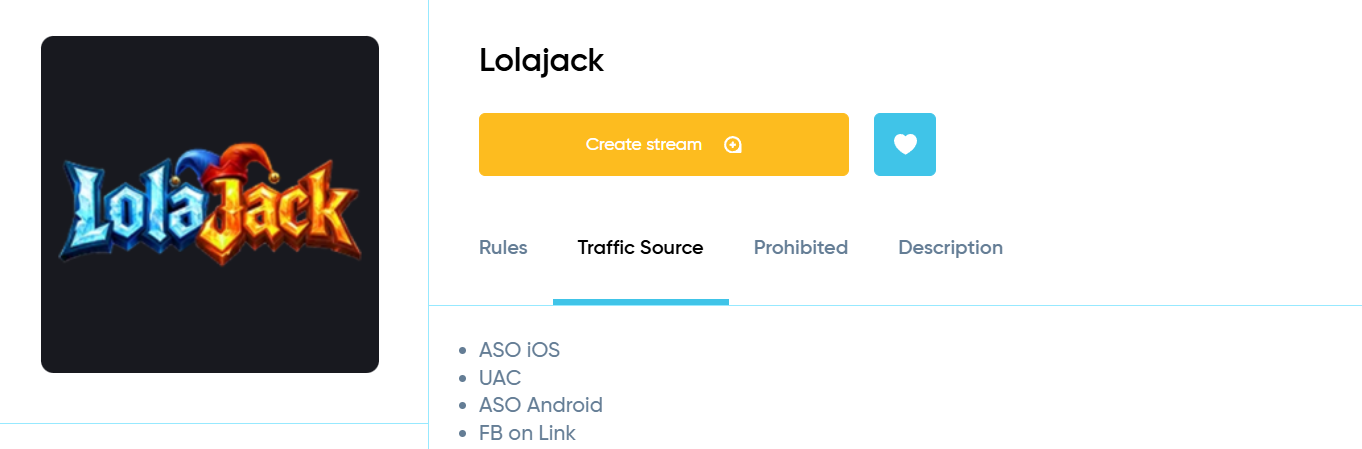
The offer supports several GEOs and different traffic sources. Therefore, when preparing a campaign, it is important to consider not only the selected country but also the specific source through which the advertising will be launched.
Main Offer Parameters
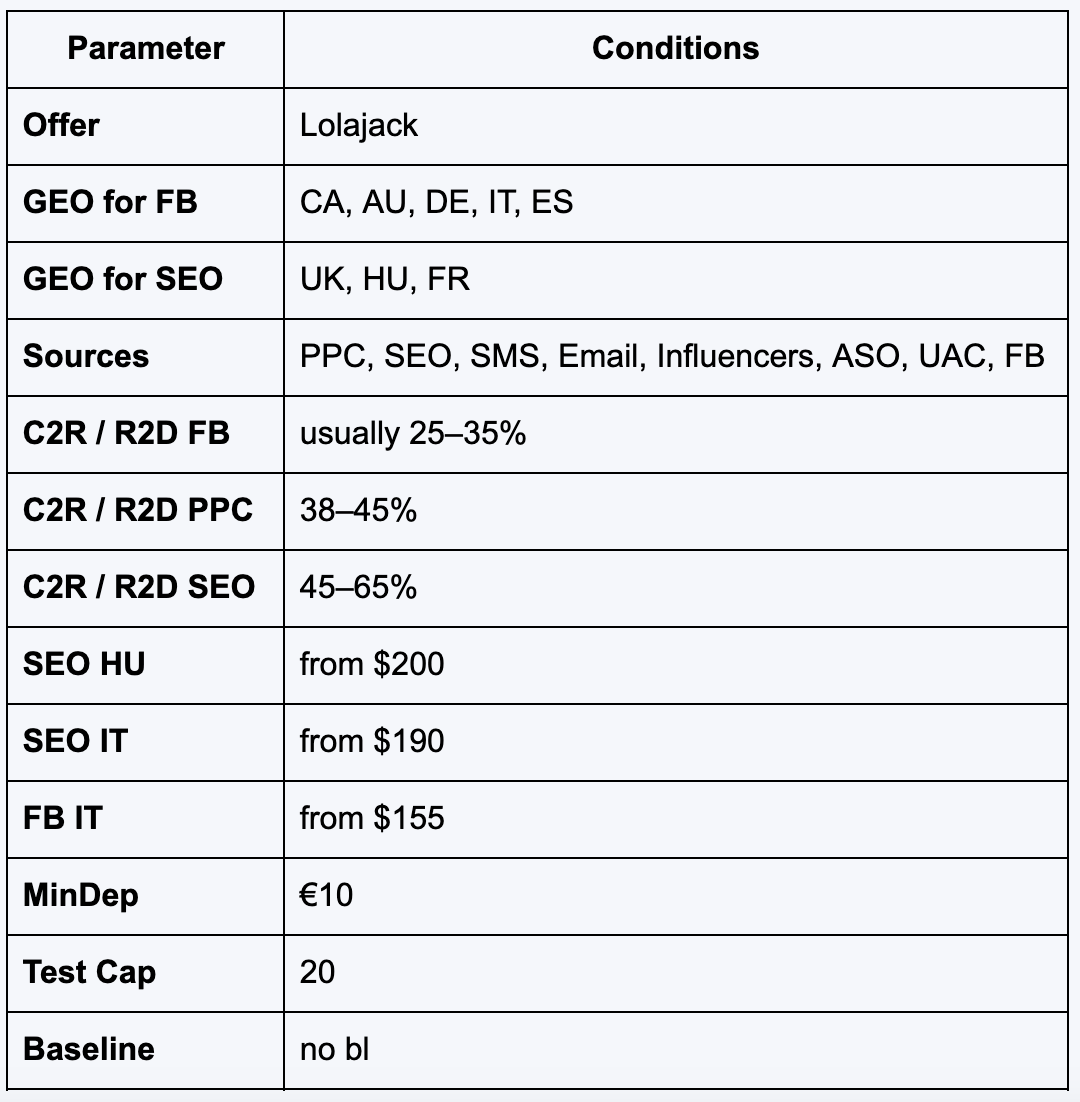
These conditions show that the setup needs to be adapted not only to the GEO but also to the specific traffic source.
Why It Is Important to Consider the Specifics of the Offer
Lolajack can be promoted through several channels, so before launching, it is worth determining the GEO + source + advertising infrastructure combination in advance.
For example, Facebook is available for CA, AU, DE, IT, and ES, while SEO includes UK, HU, and FR.
Before launching, it is worth checking:
- Whether the selected GEO matches the offer conditions.
- Whether the specific traffic source is allowed.
- Whether the landing page is prepared.
- Whether the landing page works correctly on the devices being used.
- Whether the advertising setup complies with the affiliate program requirements.
- Whether traffic routing is configured correctly.
Thus, the setup is not created in the abstract but for a specific combination of traffic source and GEO.
5 Steps to Launch Cloaking
Now let's look at how to prepare cloaking for the Lolajack offer from CPAgetti.
1. Create a White Page
First, prepare an informational page that matches the topic of the advertising campaign and the requirements of the selected traffic source.
One option is to use the AI White Page Generator inside Cloaking.House.
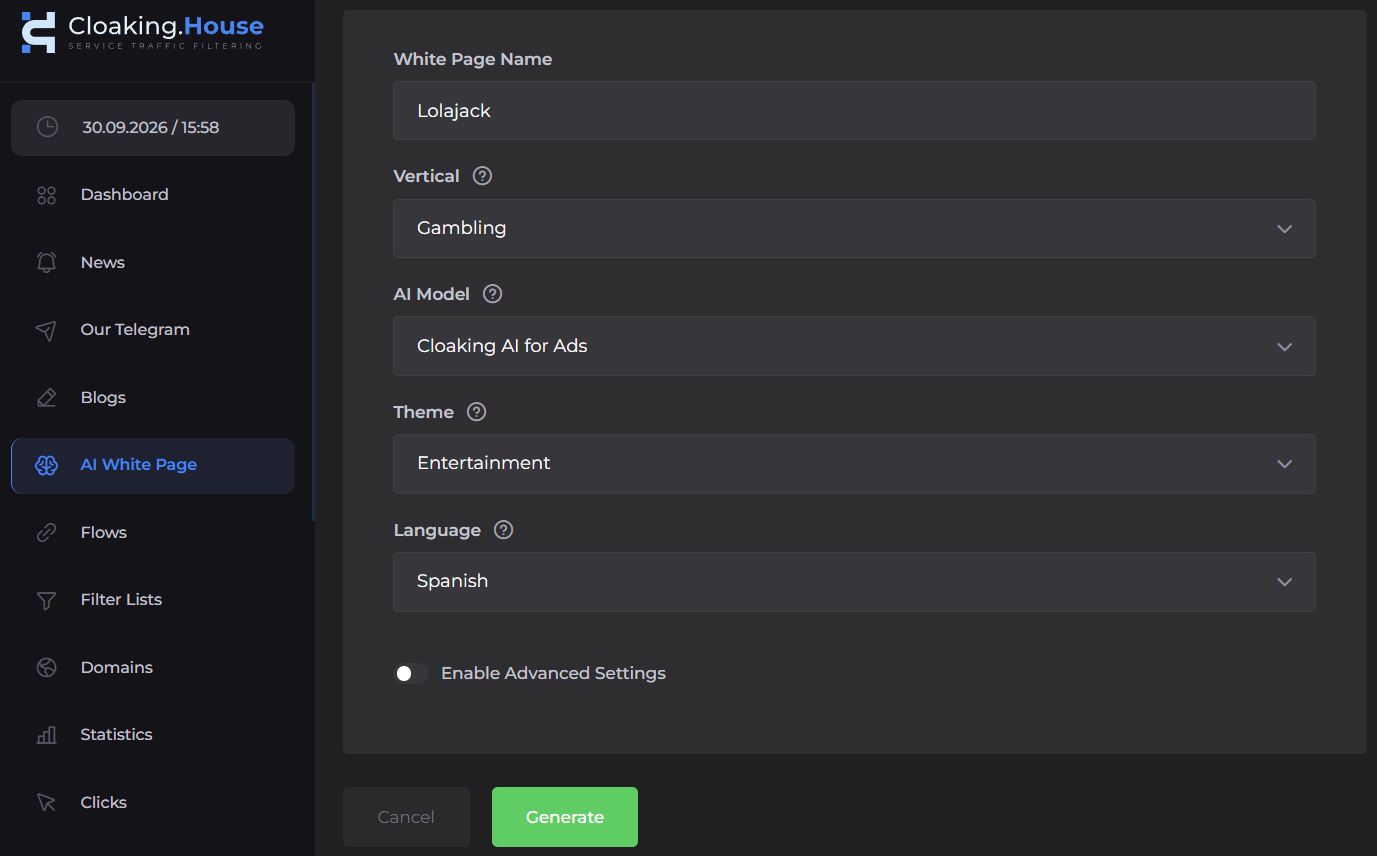
When creating the page, you can select a suitable topic, language, and structure. Let's take Spain as the GEO.
What needs to be checked before launching:
- A relevant informational page has been created.
- The text matches the selected GEO and traffic source.
- The layout displays correctly on mobile devices.
- The file has been uploaded to the root folder of the domain on the hosting.
Important: if you use the PHP integration of Cloaking.House, the informational page file should be placed according to the service instructions. In a typical setup, you can rename index.html to site.html so that the main index.php file handles traffic processing.
2. Configure Traffic Routes
After preparing the White Page, go to the Flows section in the Cloaking.House dashboard.
Here you can create a separate setup for Lolajack and the specific traffic source.
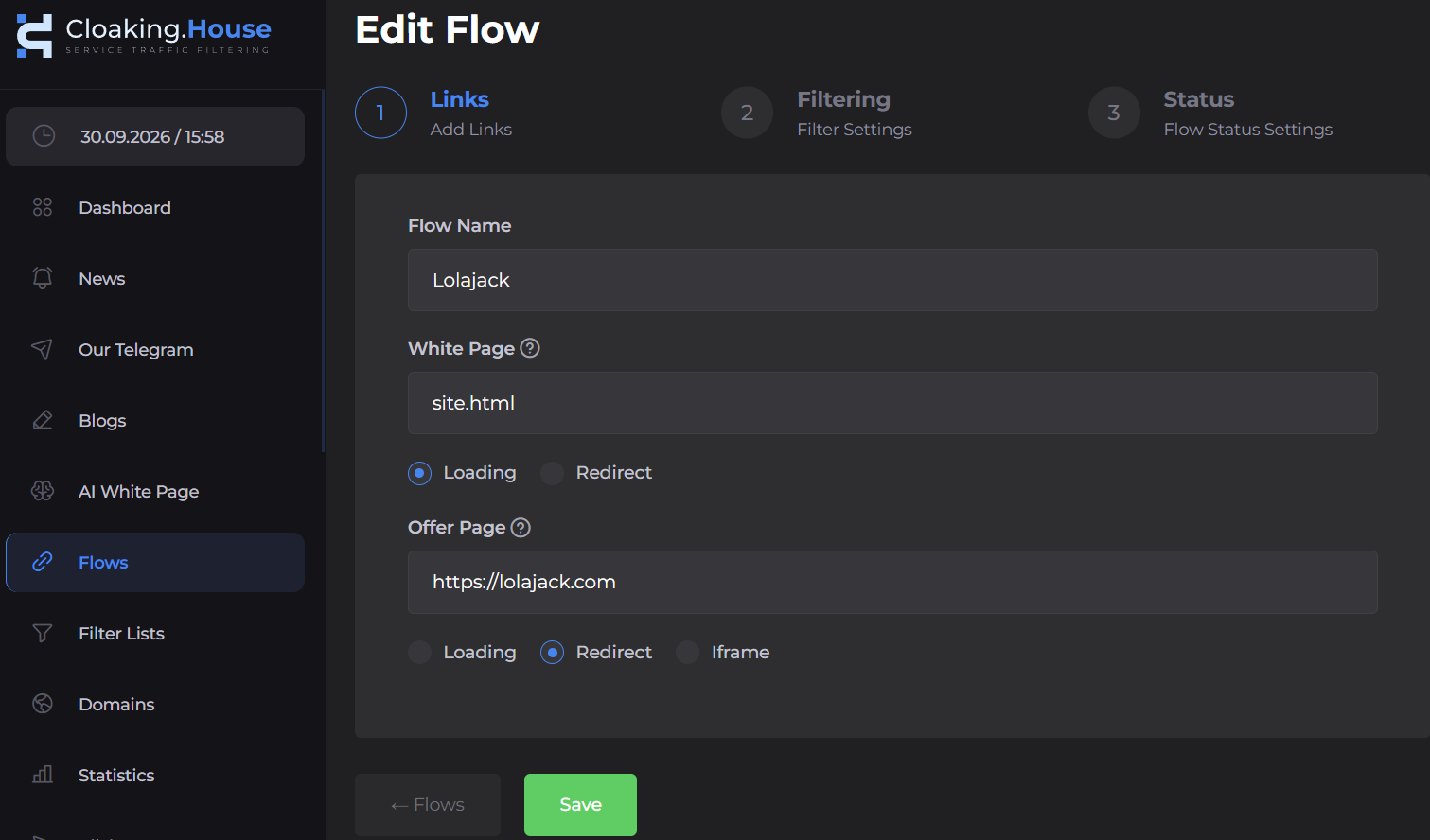
- Add the prepared white page, specify the file name (our renamed site.html), and select the "Load" method.
- Specify the offer page and select the "Redirect" method.
- Save the Flow.
If you plan to launch several traffic sources, it is convenient to create separate flows for different advertising directions.
3. Set Filters for the Required GEO
The next step is configuring the filtering parameters.
Since Lolajack works with different GEOs and traffic sources, the parameters should be set according to the specific campaign. In this case, we will show the setup for Spain.
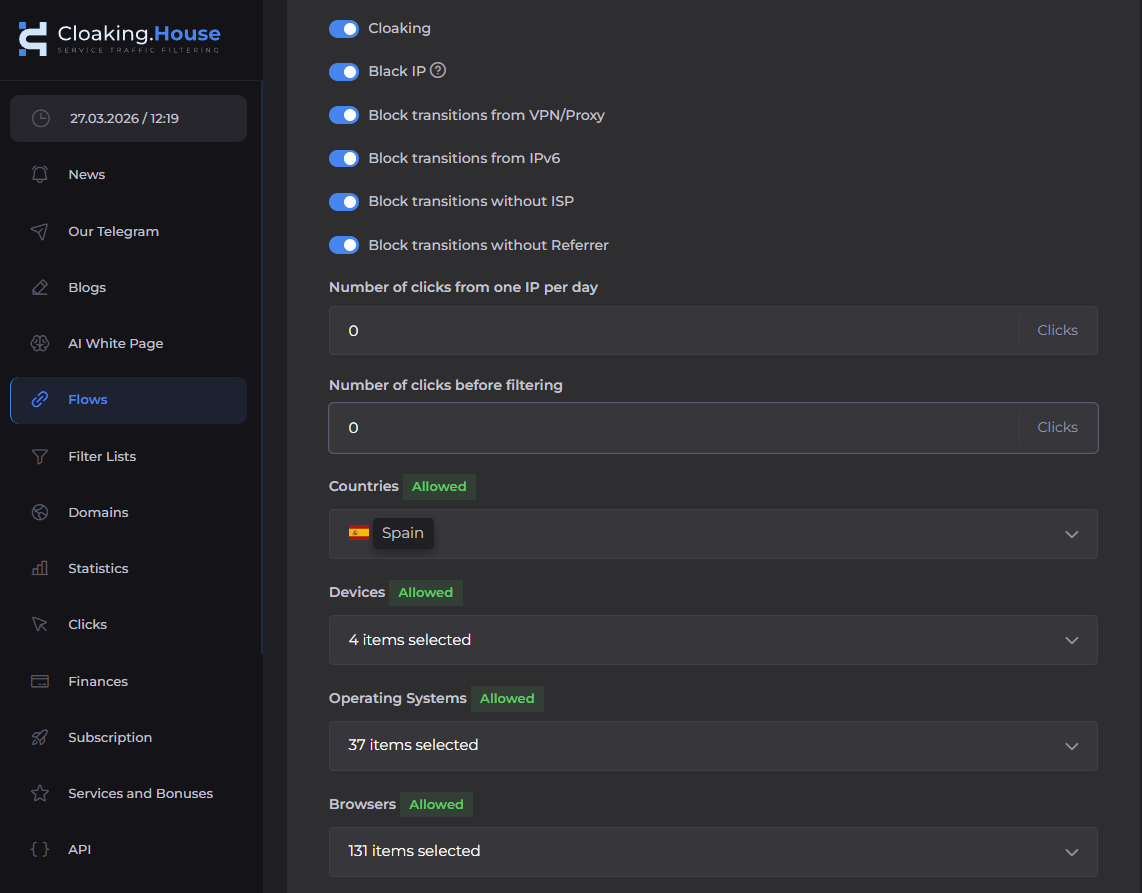
Depending on the task, you can also consider:
- Devices.
- Operating systems.
- Browsers.
- ISP.
- VPN / Proxy.
- Language.
- Referrer.
When launching advertising, it is important to check that traffic from the required GEO is processed correctly and matches the created Flow.
4. Integrate the System Core
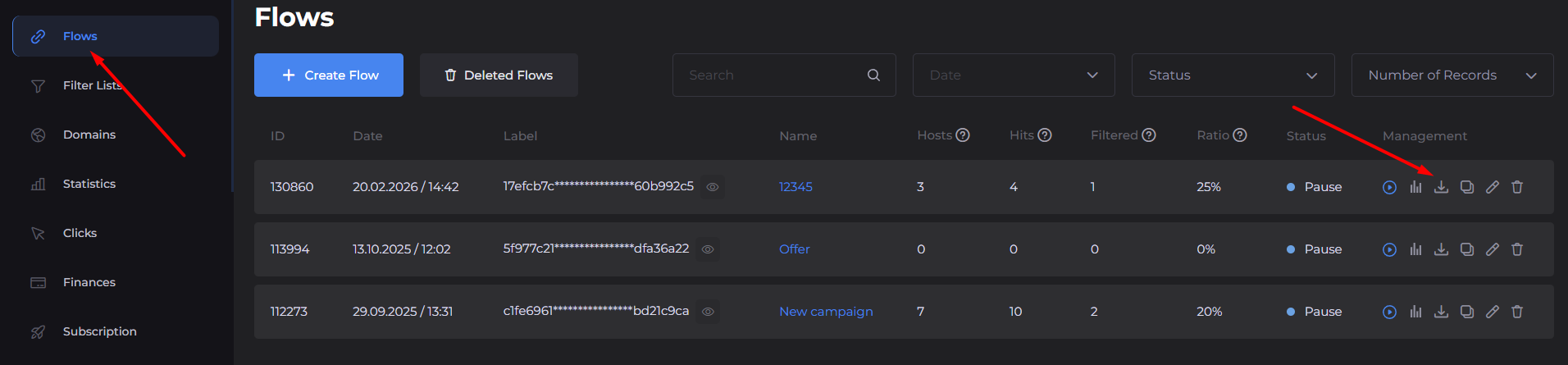
If you use the PHP integration:
- Download the unique index.php file from the Cloaking.House dashboard.
- Upload it to the root directory of the domain.
- Make sure the required informational page is placed alongside it.
- Check that the integration works correctly.
- Perform test visits.
The file connects your domain to the cloud-based filtering engine.
Before launching advertising, make sure that the pages open correctly and that visits are displayed in the analytics.
5. Analyze and Scale
After launching the campaign, it is important to track not only the number of visits but also the quality of the traffic.

In the Clicks section, you can analyze:
- Number of visits.
- Click processing result.
- Triggered filter.
- GEO.
- IP.
- Language.
- ISP.
- Referrer.
- User-Agent.
- Device.
- OS.
- Browser.
This data helps you understand how a specific setup is working and which parameters may require additional configuration.
For example, if one combination of GEO and traffic source shows noticeably different results compared with another, the data from Clicks can be used to further check the characteristics of the incoming traffic.
This is especially relevant for Lolajack because the offer works with several traffic sources and GEOs. Separate Flows allow you to avoid mixing statistics and analyze each direction individually.
Conclusion
Launching Lolajack is not only about choosing an offer and a traffic source, but also about properly preparing the entire advertising setup. Before launching, it is important to consider the GEO, the requirements of the selected source, and the conditions of CPAgetti, while also checking the technical side in advance in Cloaking.House.
Our partner has also prepared a bonus: use the promo code CPAGETTI to get a 30% discount on all Cloaking.House plans.